MiniMax H3 / 2 MIN READ
MiniMax H3 product reveal video: a controlled studio workflow
Create a short product reveal by keeping the product still and giving the camera one simple movement.
Text to videoTHE JOLLYAI FIELD GUIDE / 50 PRACTICAL ARTICLES
Learn the models. Plan the shot. Make something worth keeping.
Video workflows, image edits and production notes for MiniMax H3, LTX 2.5, Wan 2.2, Qwen and FLUX.2 Klein.
Find your next workflow ↓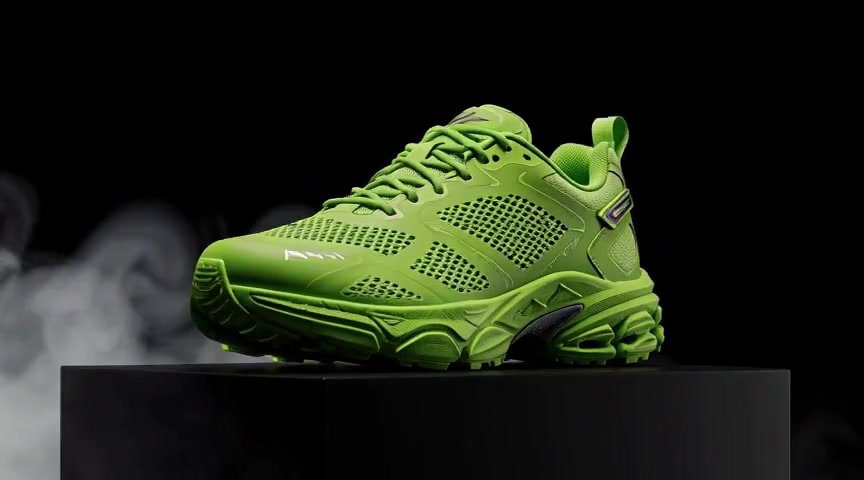 ORIGINAL H3 DEMONSTRATION One product. One shot. ↗Watch the clip and inspect its settings
FROM THE FIRST PROMPT TO THE FINAL CUT
Choose a model or search for a task.
Every guide is readable without signing in.
50 guides
MiniMax H3 / 2 MIN READ
Create a short product reveal by keeping the product still and giving the camera one simple movement.
Text to videoMiniMax H3 / 2 MIN READ
Camera prompts work best when they describe a change in viewpoint rather than a collection of cinematic adjectives.
Text to videoMiniMax H3 / 2 MIN READ
The source image is your opening composition.
Image to videoMiniMax H3 / 2 MIN READ
Reference-to-video is useful when a subject should appear in a new composition rather than simply move from a fixed opening frame.
Reference to videoMiniMax H3 / 2 MIN READ
A reference video can communicate motion or visual context that is awkward to describe in a sentence.
Reference to videoMiniMax H3 / 2 MIN READ
Choose a MiniMax H3 workflow according to what you already know about the shot.
Text to videoMiniMax H3 / 2 MIN READ
A short AI clip needs a small story: a starting state, a visible change and a readable ending.
Text to videoMiniMax H3 / 2 MIN READ
MiniMax H3's JollyAI workflow generates audio and video together.
Text to videoMiniMax H3 / 2 MIN READ
Dialogue introduces several things to check at once: the words, voice, mouth movement and timing.
Text to videoMiniMax H3 / 2 MIN READ
A vertical product Reel needs room for the item, movement and the platform interface.
Image to videoMiniMax H3 / 2 MIN READ
Image-to-video can turn an approved catalogue photograph into a short motion asset.
Image to videoMiniMax H3 / 2 MIN READ
Food clips become harder when several materials move at once.
Image to videoMiniMax H3 / 2 MIN READ
A single interior image can support a short camera move, but it does not contain a complete 3D building.
Image to videoMiniMax H3 / 2 MIN READ
Fashion animation needs a clear distinction between mood and garment accuracy.
Image to videoMiniMax H3 / 2 MIN READ
An action clip feels fast when the subject's direction is clear and the surroundings reinforce it.
Text to videoMiniMax H3 / 2 MIN READ
Generate B-roll from a shot list rather than from an entire video script.
Text to videoMiniMax H3 / 2 MIN READ
A longer story is easier to manage as separately generated shots with a shared visual brief.
Reference to videoMiniMax H3 / 2 MIN READ
Aspect ratio describes the frame's shape; resolution describes its pixel dimensions.
Text to videoMiniMax H3 / 2 MIN READ
Create MiniMax H3 videos up to 10 seconds with JollyAI PRO, or try limited four-second clips free.
Text to videoMiniMax H3 / 2 MIN READ
“How fast is MiniMax H3?” needs a defined workload.
Text to videoMiniMax H3 / 2 MIN READ
The H3 sampling step count is a server-side workflow setting in JollyAI, not a public quality slider.
Text to videoMiniMax H3 / 2 MIN READ
Quantization changes how model weights or calculations are represented to make an implementation more manageable.
Text to videoMiniMax H3 / 2 MIN READ
Start by naming the visible failure.
Image to videoMiniMax H3 / 2 MIN READ
A loop needs a smooth boundary between its ending and beginning.
Text to videoMiniMax H3 / 2 MIN READ
The generation is only the first production step.
Text to videoLTX 2.5 / 2 MIN READ
An establishing shot tells the viewer where the scene takes place before asking them to follow an action.
Text to videoLTX 2.5 / 2 MIN READ
An image-to-video prompt should tell the model what changes over time.
Image to videoLTX 2.5 / 2 MIN READ
JollyAI's LTX 2.5 video workflow includes an audio path.
Text to videoLTX 2.5 / 2 MIN READ
A portrait Short needs a clear centre of attention and an edit that supports the narration or hook.
Text to videoLTX 2.5 / 2 MIN READ
Choose between LTX 2.5 and Wan 2.2 using your delivery requirements and a small matched test.
Text to videoLTX 2.5 / 2 MIN READ
Repeatedly adding adjectives can make a failed prompt harder to diagnose.
Text to videoLTX 2.5 / 2 MIN READ
A three-shot product ad can give each generation a clear purpose: establish the item, show one detail and end with a readable offer.
Image to videoLTX 2.5 / 2 MIN READ
Performance includes more than generation speed.
Text to videoWan 2.2 / 2 MIN READ
Wan 2.2 image-to-video can add movement to a product photograph, but the final asset still needs an accuracy check.
Image to videoWan 2.2 / 2 MIN READ
A landscape clip can feel alive through small environmental motion.
Text to videoWan 2.2 / 2 MIN READ
Two endpoint images describe where a transition begins and ends, but they do not fully specify the path between them.
First / last frameWan 2.2 / 2 MIN READ
Fast motion is difficult to evaluate when the camera, subject and background all change direction.
Text to videoWan 2.2 / 2 MIN READ
Frame count and frame rate together determine playback duration, but a generation pipeline can also interpolate, trim or re-encode frames.
Text to videoWan 2.2 / 2 MIN READ
A silent Wan clip can still be a useful production asset.
Text to videoWan 2.2 / 2 MIN READ
Affordable B-roll starts with a small shot list and a clear acceptance standard.
Text to videoQwen Image Edit / 2 MIN READ
Background replacement is easier to review when the requested edit has one clear boundary: change the setting while preserving the subject.
Image editingQwen Image Edit / 2 MIN READ
Colour variants can help explore a product presentation, but a generated colourway is not proof that the product exists in that finish.
Image editingQwen Image Edit / 2 MIN READ
JollyAI's Qwen editing route accepts up to three input images.
Image editingQwen Image Edit / 2 MIN READ
Separate scene design from motion.
Image editingQwen Image Edit / 2 MIN READ
A good image edit changes the requested feature while keeping important details stable.
Image editingFLUX.2 Klein / 2 MIN READ
Changing the background and changing the light are related tasks.
Image editingFLUX.2 Klein / 2 MIN READ
A campaign needs visual variety without losing the identity of the product.
Image editingFLUX.2 Klein / 2 MIN READ
Klein editing and video generation solve different parts of a creative task.
Image editingFLUX.2 Klein / 2 MIN READ
The useful comparison between Klein and Qwen is whether each preserves the details your project requires while making the requested change.
Image editingFLUX.2 Klein / 2 MIN READ
Review a Klein edit at the level required by its destination.
Image editingNo matching guide. Try another model or a shorter search.
Written for creators and small businesses using JollyAI. Reviewed on September 20, 2026 against our local workflow configuration. Prompt recipes are suggested starting points; only explicitly labelled demonstrations describe generated results. Selected examples are not universal benchmarks.
These models have different licences and deployment settings. Open weights do not automatically mean unrestricted commercial use. Each guide links to the relevant upstream project, explains our integration and points to current account access.
How we separate sample timing from a benchmark ↗