LTX 2.5 / THE SAMPLE GALLERY

LTX 2.5 video examples.
Prompts you can use.

Watch the result. Copy the prompt. Create online.

Watch original LTX 2.5 text-to-video results with their full prompts and actual output details. Explore the image-to-video workflow to animate your own source image in JollyAI’s online studio.

LTX 2.5 desert cycling action scene generated on JollyAIAN IDEA. A CAMERA MOVE. A STORY.Watch the original LTX 2.5 result ↗
1 published sample2 available workflowsPRO generation accessAudio included in sample

START WITH WORDS

Text to video

Describe the subject, action, camera and sound. LTX 2.5 text-to-video currently requires PRO on JollyAI.

Open text to video ↗

START WITH A STILL

Image to video

Upload one source image and describe how it should move. LTX 2.5 image-to-video currently requires PRO. Check the studio for available duration presets and account limits.

Open image to video ↗

WATCH / INSPECT / CREATE

LTX 2.5 sample videos and generation prompts

Play with sound.
Exact output details below each video.

T2V

Text to video

Direct a scene with words.

Open workflow ↗
LTX 2.5 · PRO4.708 seconds
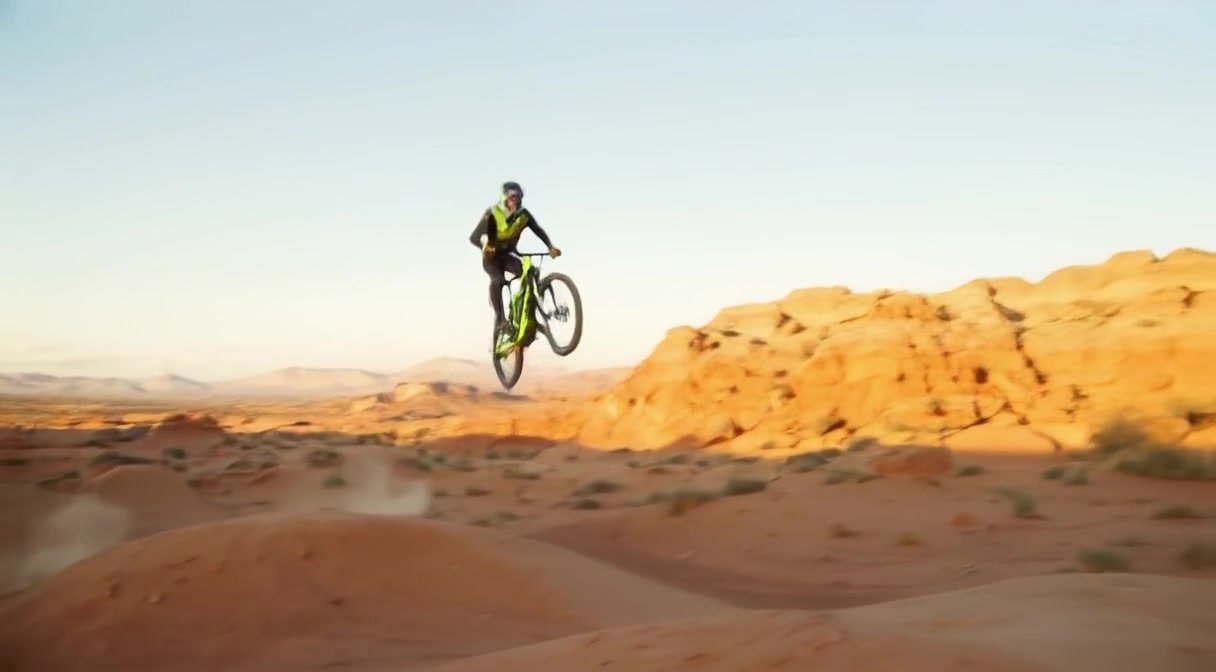
Desert momentum

1216 × 672

Generation prompt

Cinematic action commercial. A professional adult mountain biker wearing a full helmet and protective sports clothing jumps a small ridge on a marked closed desert sports course at golden hour, then lands smoothly and speeds away. The bike has bright acid-green accents. A low tracking camera follows alongside, dust billows backward, orange canyon walls rush past, sunlight catches individual particles, powerful forward movement, realistic weight and continuous coherent motion. One uninterrupted wide shot, no crash or injury, no text or logos. Sound: tires rolling over sand, a brief freewheel click and rushing wind. Landscape 16:9.

Generate with T2V ↗
I2V

Image to video

Bring a source image to life.

Open workflow ↗

New image-to-video samples are being prepared. The workflow is available in the studio.

ABOUT THESE EXAMPLES

See the result and the recipe.

These are curated, AI-generated JollyAI outputs. Their actual sizes and durations are measured from the video files. Results vary with prompts and source images; output dimensions can change with the chosen duration preset. Web encoding keeps the original output dimensions.

The collection is expanding to include cinematic stories, facial expressions, UGC-style ad demonstrations, and original 3D and 2D children’s animation. Only completed videos appear as playable samples. Edited ads will identify their individual shots and editing steps.

LTX 2.5 reference-to-video is not currently offered as a separate JollyAI workflow. For limited free video generation and reference-guided options, explore MiniMax H3.

FROM EXAMPLE TO YOUR OWN VIDEO

How to use an LTX 2.5 prompt

  1. Watch the sample and check its motion, subject consistency and audio.
  2. Select See more under the video, then Copy prompt.
  3. Open the matching text-to-video or image-to-video workflow. Replace the subject and setting with your own idea; keep one clear action and camera move for a short clip.
  4. Choose an available preset, generate, and review the result before publishing.

For text-to-video prompts, describe the subject, setting, action, camera and sound. For image-to-video prompts, explain what should move and what should stay consistent with the source image. For deeper model guidance, see the official LTX prompting guide.

Continue with our LTX 2.5 cinematic shot guide, image-to-video motion brief or output quality checklist.

CHOOSE YOUR WORKFLOW

Use LTX 2.5 online: text to video or image to video

Start with LTX 2.5 text-to-video when you have an idea but no source image. Choose LTX 2.5 image-to-video when the starting subject, composition or style is already in a picture. Both JollyAI workflows currently require PRO.

Comparing affordable AI video tools? Check the current JollyAI PRO pricing and generation allowances alongside the sample quality, duration options and usable output size. The gallery does not quote a fixed per-video price because your allowance depends on your plan.

LTX 2.5 QUESTIONS

Video examples, prompts and access FAQ

Is LTX 2.5 free on JollyAI?

You can watch these examples and copy their prompts without a paid plan. Generating LTX 2.5 videos on JollyAI currently requires PRO. For limited free video generation, try MiniMax H3; daily allowance and queue limits apply.

Can I use LTX 2.5 online without my own GPU?

Yes. JollyAI runs generation on its hosted infrastructure. Use the browser-based playground without installing ComfyUI or running a model on your computer. PRO access is required for LTX generation.

Where can I find the prompt used for each LTX video?

Each published sample shows the first two lines of its generation or animation prompt. Select See more to read the complete prompt in a modal, then use Copy prompt to reuse it.

What resolution and duration will I get?

Each sample lists its measured dimensions and actual duration. Your result depends on the selected workflow and preset. Check the current duration options in the playground; a sample’s output size is not a promise that every preset uses that size.

Can I make UGC ads, YouTube Shorts and cartoon animation?

You can direct those kinds of scenes through text or source-image animation. Review faces, hands, product consistency and sound in every result. For a finished ad or episode, edit your clips together and add branding or captions afterward. Our new ad and cartoon examples are being prepared; they are not yet published in this collection.

MAKE YOUR NEXT SHOT

Your story.
Your direction.

GENERATION / ANIMATION PROMPT

Full prompt